

Today, we don't always need to meet face-to-face or be in the same room to get work done. Many of us are working from home or in different locations because of recent changes in the world.
This makes it super important to have good online tools that help teams work together, no matter where they are.
If you're someone who manages a team or runs a business, you'll want to make sure your team stays on track and works well together, even if they're miles apart.
In this blog, we'll talk about seven awesome tools that can make managing projects and teamwork easier and more fun for remote teams.
Let's dive in and find out which ones might be perfect for you!
In our digital age, the importance of project management tools for remote teams cannot be overstated.
These tools aren't just software; they're pillars ensuring stability and fostering collaboration, communication, and efficiency.
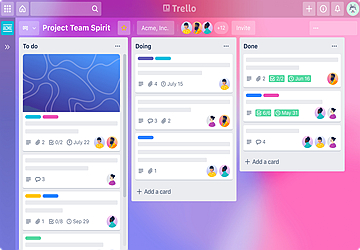
Trello is more than just a pretty face in the world of project management. It’s your digital whiteboard filled with sticky notes that can move, change colors, and even talk back (well, sort of).
It easily visualizes task flow, integrates with a multitude of other apps, and has a user-friendly interface suitable for all team sizes.
The free basic version is available with premium features for advanced users. No more endless email chains or forgotten tasks; everything is in one place.
Use labels and due dates for better prioritization.
Key Features:
● Drag-and-drop functionality.
● Collaboration in real-time.
● Customizable boards.
● Automation with Butler.
It’s a flexible, visual delight that can make managing tasks feel more like a game than work.
Slack isn’t just a communication tool; it’s where work happens. Think of it as your office's virtual water cooler.
Provide real-time messaging and file-sharing channels to separate different project communications and integrate with many other platforms.
Cuts down email clutter and fosters a sense of team unity. Make use of bots and integrations to automate tasks.
Key Features:
● Message search.
● Direct messaging.
● File sharing and commenting.
● Integration capabilities.
For teams looking for fluid communication, Slack is the go-to choice.
When you dream of organized task management, you’re probably dreaming of Asana.
It breaks tasks into manageable pieces, visual project timelines, and team calendars to track deadlines, which is useful for both small and large teams.
Say goodbye to missed deadlines and overlooked tasks.
Key Features:
● Task dependencies.
● Milestones.
● Portfolios.
● Workload view.
Asana makes it feel like you have an extra set of hands helping you organize.
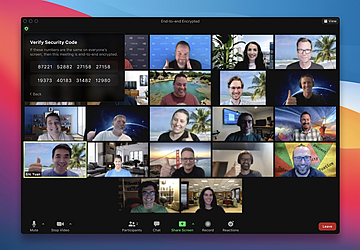
With Zoom, distance is no longer a barrier. It brings your team face-to-face, even when miles apart.
It provides HD video conferencing, screen-sharing capabilities, breakout rooms for team discussions, and recording meetings for future reference.
No more misunderstandings; communicate clearly and directly. Ensure good internet connectivity and use headphones for clearer audio.
Key Features:
● Virtual backgrounds.
● Touch up my appearance feature.
● Meeting scheduling.
● End-to-end encryption.
Zoom is the bridge that makes remote working feel a tad bit closer.
Monday.com stands out as a vibrant visual project management tool that's versatile enough to cater to a wide range of industries.
It has customizable workflow templates and an intuitive drag-and-drop interface.
Visual project tracking integration capabilities with other apps.
Centralizes all tasks and discussions, ensuring nothing gets overlooked. Utilize the automation features to reduce repetitive tasks.
Key Features:
● Time tracking.
● Automated notifications.
● Gantt views for timelines.
● Kanban boards.
For teams that love visual aids and a color-coded system, Monday.com brings a touch of vibrancy to project management.
A veteran in the world of project management, Basecamp is like your digital HQ, offering a comprehensive suite of tools all in one place.
Its benefits are centralized document storage, to-do lists to track project tasks, message boards for team discussions, and a built-in schedule and calendar.
Streamlines communication and eliminates the need for multiple apps. Use the Hill Charts feature to track project progress visually.
Key Features:
● Real-time group chat (Campfires).
● Direct messaging.
● Hill charts for project status.
● Automatic check-ins.
Basecamp's holistic approach ensures that whether you're a team of 5 or 50, everyone stays in the loop.
The notion has quickly risen in popularity due to its versatile workspace that combines notes, tasks, wikis, and databases.
Provide All-in-one workspace catering to various needs, customizable templates for different projects, collaborative in real-time, and nested pages for detailed organization.
Leverage the toggle feature to keep your notes organized and easy to skim through.
Key Features:
● Kanban board, calendar, and list views.
● Database functionality with powerful filtering.
● Embeds (from maps to tweets).
● Comprehensive integration capabilities.
Notion's comprehensive suite makes it more than just a project management tool; it's a digital workspace for your team to think, plan, collaborate, and create.
These platforms are more than just software; they are the scaffolding that supports a team's efficiency, collaboration, and productivity.
With the proper implementation, challenges become more manageable, communication flows smoother, and tasks are executed more efficiently.
It's essential to remember, however, that while tools provide structure and ease, the real magic happens with a united team working towards a shared goal.